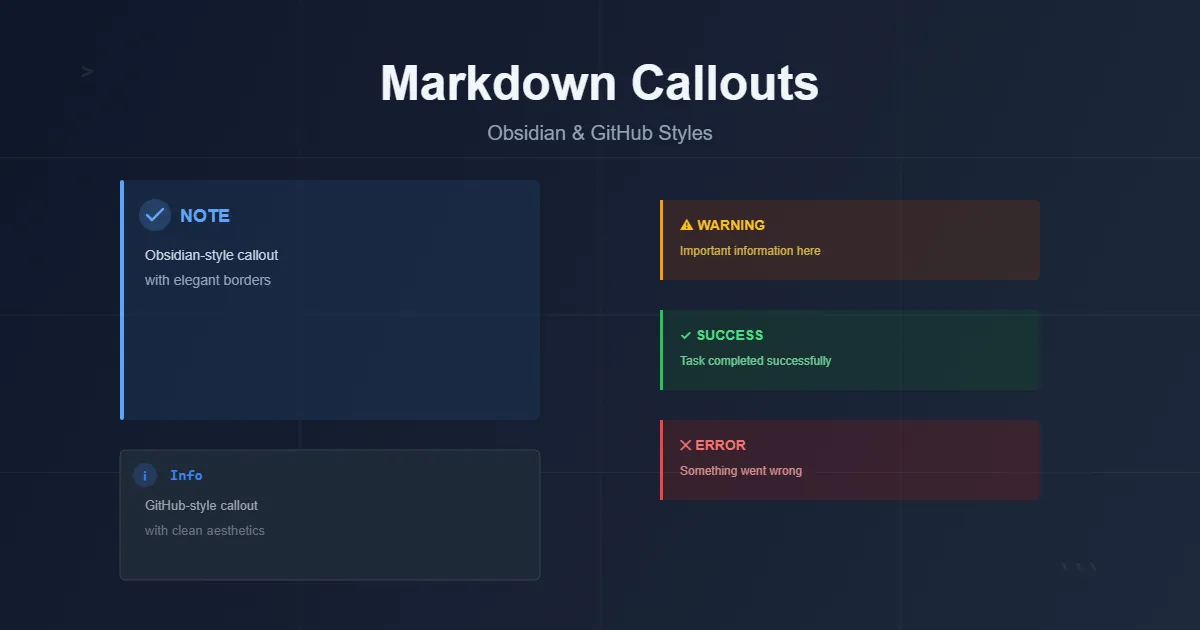
obsidian이 인기를 끌고 github를 구경하다보니 callouts에 대해서 알게 되었습니다.
심심한 마크다운 파일에 살짝 재미를 더해줍니다.
옵시디언으로 작성한 .md 파일을 Astro, Gatsby, 11ty, Hugo, docusaurus 등 SSG 생성기를 이용해 블로그에 게시하면 기본적으로 모든 callouts이 마크다운 기본 blockquote로 보입니다.
[warning]
정식 마크다운 문법이 아님
그래서 요즘 remark-callouts 같은 것들로 사이트에 callouts을 구현하는 사람들이 많아지는 것 같습니다.
이미 좋은 것들이 많이 공개되어 있습니다.
rehype-callouts
제 눈에는 이게 제일 좋아보이는데, 바로 갖다 쓰면 재미가 없잖아요.
물론 저는 개발자가 아니니까 CSS 제외하면 AI가 99% 작성할텐데, AI 한테 계속 물어보니까 “5분만 투자해서 이미 잘 만들어진 것을 갖다 쓰시는 것이 정신건강(?)에 좋습니다”라고 권유하더라구요.
그러거나 말거나 여러 AI를 압박해서 스스로(?) 만들어봅니다.
첫 고민 : 어떤 작성 방법을 선택할 것인가
일단 가장 중요하게 생각한 것은 callouts 기능을 사용해서 작성한 글을 일반적인 마크다운 뷰어/에디터 혹은 마크다운 기반 노트에서 볼 경우 이질감이 적어야 합니다.
작성 방법은 크게 2가지로 나뉘는 것 같습니다.
:::note
이 방식은 callouts을 포함해서 여러 다양한 기능을 원할 때 택하는 방식입니다.
예를 들어 :::video 로 유튜브 링크를 삽입합니다.
:::
> [!NOTE]
> obsidian과 github에서 사용하는 방식입니다. 다른 기능은 필요없고 callouts만 필요하다면 둘 중에서는 당연히 아래쪽의 방식으로 작성해야 합니다.
obsidian의 유행이 끝나더라도 마크다운 파일 형식은 아주 오래 사용될 것이 분명하므로, 최대한 오리지널 마크다운 문법에 맞게 작성해야 하고, 그러면 적어도 blockquote 형태로 보여주고 읽을 때도 조금 더 자연스럽습니다.
> [!Warning]
> callouts 형식으로 작성

:::note
일반 마크다운 뷰어로 볼 때
:::

> [Warning]
> 정식 마크다운 문법이 아니고 callouts 형식도 아니지만 자연스럽게 읽힘 callouts 형식으로 작성
:::note
일반 마크다운 뷰어로 볼 때
:::
[Warning]
정식 마크다운 문법이 아니고 callouts 형식도 아니지만 자연스럽게 읽힘
시작 : 자꾸 이것저것 설치하기 좀 그런데…
AI에게 시켜보니까 unist-util-visit 이건 꼭 설치해야 한답니다.
unist-util-visit 가 뭔가요?
역할과 핵심 기능
- 트리 워킹(트리 순회): 루트부터 자식 노드까지 재귀적으로 방문하며, 특정 타입이나 조건에 맞는 노드만 골라 처리할 수 있습니다.
- 유연한 필터링: 노드 타입 문자열, 배열, 혹은 사용자 정의 테스트 함수를 인자로 받아 방문 대상을 정할 수 있습니다.
- 제어 흐름: 방문 중 CONTINUE, SKIP, EXIT 같은 반환값으로 순회 흐름을 제어할 수 있어 복잡한 변환에 유용합니다.
언제 사용하나
- 마크다운/HTML AST 변환, 플러그인 개발, 코드 분석/리팩터링 등 AST를 다루는 모든 상황에서 사용합니다. remark, rehype 같은 생태계 플러그인에서 표준적으로 쓰입니다.
안그래도 블로그가 자꾸 무거워지는 느낌인데 또?
엇? 블로그에 검색 기능을 추가할 때 설치했었네요.
끝이 없는 수정
여러분도 AI에게 코딩 한 번 시켜보십시오.
요즘 AI 성능이 아무리 좋아졌다지만 자바스크립트 200줄도 안되는 callouts 이 정도의 기능도 아직 한 번에 뚝딱 만들지 못합니다.
계속 시키면 되잖아? 하겠지만 무료 사용자는 여러 AI를 번갈아 가면서 써야 합니다.
그러면 A가 만들다가 무료 한도 초과해서 B한테 물어보고 수정하면 또 잘 되던 것들이 안되고, C한테 다시 물어보고… 반복입니다.
이 과정에서 중요한 것은 코드를 중간중간 따로 저장해서 보관해야 한다는 것입니다.
코드의 완성도가 8 -> 6 -> 7 -> 9 -> 7 -> 5 이런식으로 흘러가기도 하는데 따로 저장을 하지 않을 경우 9의 코드로 되돌리기가 어렵습니다.
아마 git이 이런 상황을 위해 개발된 것 같은데, 맞나…
암튼 여러 AI에게 번갈아서 반복적으로 물어보다보면, 좋았던 코드를 다시 찾을 수 없는 상황이 반드시 오기 때문에 테스트 결과가 좋을 때마다 따로 저장을 해두면 좋습니다.
이것저것 테스트해보고 잘되는 것처럼 느껴져서 이제 끝이다 하는 순간 다시 한 번 꼼꼼하게 체크합니다.
작성자가 할 수 있는 실수들을 가정해서 여러 상황을 알려달라고 물어보고 다시 테스트를 반복합니다.
마지막은 CSS
이정도면 됐다! 싶으면 이제 CSS가 남았죠.
색상과 레이아웃을 결정하는 것은 전적으로 나의 선택이지만 좋은 색 고르기 쉽지 않습니다.
전문가들이 선택한 색을 참고해서 적용하세요.
색상, 레이아웃같은 디자인 수정은 끝이 없는 것 같습니다.
얼마 지나면 마음에 들지 않는 부분이 보여서 수정하게 되고, 또또…
.callout-wrapper {
  display: contents;
}
어느 AI와의 마지막 대화에서 위 코드를 추가하면 좋다던데, 잘 모르겠고 그냥 추가했습니다.
결과물 확인
최대한 많은 테스트를 마친 현재의 상태입니다. 언젠가 또 수정하겠지만…
완성된 상태에서 기능을 추가하거나 CSS를 수정하는 것은 아무 것도 아닙니다.
기본 blockquote
blockquote 내부 중첩
이게 되네
이건?
기본 스타일 스타일 이탤릭
title 숨김 옵션
- css 이렇게 설정하면 뭐 대충 옵시디언 스타일 아닙니까?
- 박스의 색감이 별로라구요?
- obsidian 공식 사이트의 색조합을 그대로 사용했습니다.
- 이제 흔하지 않고 튀지 않으면서도 우아하고, 감각있는 전문가의 손길이 닿은 색조합처럼 느껴질 겁니다.
- 하지만 obsidian 스타일을 사용하면 callout에 눈길이 너무 많이 간다는 느낌입니다.
.md 파일이 아닌 .html 느낌이 강합니다.
그래서 github 스타일을 사용할 것 같습니다.
중첩 1
중첩 2 small 옵션 링크
중첩 3 제목 숨김 옵션, 크기 원래대로
AI가 어려워한, 중첩되면 일부 속성이 아래로 상속되던 문제
Who’s to say what’s for me to say? Who’s to say what’s for me to be? Who’s to say what’s for me to do? ‘Cause a big nothin’ it’ll be for me’
문장이 길 때
[QUESTION]
title을 잘 못 적을 경우
왼쪽 막대 숨김
“제목 있는 인용문”
기본 italic
code 테스트
code2test
코드블럭 테스트
import { visit } from 'unist-util-visit';

export function Callouts() {
 return (tree) => {
   visit(tree, 'blockquote', (node) => {
     processBlockquoteRecursively(node);
   });
 };
}
...- 페이지네이션 기능
- 검색 기능
- medium 스타일 image zoom 기능
- github 스타일 callouts
- header에 anchor 달기
- 사이드바
코드 확인
import { visit } from 'unist-util-visit';
export function Callouts() {
return (tree) => {
visit(tree, 'blockquote', (node) => {
processBlockquoteRecursively(node);
});
};
}
function processBlockquoteRecursively(node) {
if (!node.children || !Array.isArray(node.children)) return;
for (const child of node.children) {
if (child.type === 'blockquote') {
processBlockquoteRecursively(child);
} else if (child.children) {
for (const grandchild of child.children) {
if (grandchild.type === 'blockquote') {
processBlockquoteRecursively(grandchild);
}
}
}
}
processCallout(node);
}
function processCallout(node) {
if (!node.children || !Array.isArray(node.children)) return;
const firstChild = node.children[0];
if (!firstChild || firstChild.type !== 'paragraph') return;
if (!firstChild.children || !Array.isArray(firstChild.children)) return;
const textNode = firstChild.children[0];
if (!textNode || textNode.type !== 'text') return;
const text = textNode.value || '';
const match = text.match(/^\[!(\w+)(?:\|([\w-]+(?:\|[\w-]+)*))?\]\s*(.*)/);
if (!match) return;
const [_, type, options, titleText] = match;
const normalizedType = type.toLowerCase();
const optionList = options ? options.split('|') : [];
const hideTitle = optionList.includes('hide');
const collapsed = optionList.includes('collapsed');
const noIcon = optionList.includes('no-icon');
const small = optionList.includes('small');
const borderless = optionList.includes('borderless');
const typeMap = {
note: 'note',
tip: 'tip',
hint: 'tip',
important: 'important',
warning: 'warning',
caution: 'warning',
danger: 'danger',
error: 'danger',
info: 'info',
success: 'success',
check: 'success',
question: 'question',
todo: 'todo',
abstract: 'abstract',
summary: 'abstract',
tldr: 'abstract',
bug: 'bug',
fail: 'fail',
example: 'example',
quote: 'quote',
cite: 'quote'
};
const finalType = typeMap[normalizedType] || 'note';
const iconMap = {
note: '📝',
tip: '💡',
important: '⭐',
warning: '⚠️',
danger: '🔥',
error: '❌',
info: 'ℹ️',
success: '✅',
check: '✓',
question: '❓',
todo: '📋',
abstract: '📄',
bug: '🐛',
fail: '🚫',
example: '🔍',
quote: '💬',
cite: '📚'
};
const icon = iconMap[finalType] || '📌';
if (titleText.trim()) {
textNode.value = titleText;
} else {
if (firstChild.children.length > 1) {
firstChild.children.shift();
if (firstChild.children[0]?.type === 'break') {
firstChild.children.shift();
}
} else {
node.children.shift();
}
}
const checkboxId = `callout-${Date.now()}-${Math.random().toString(36).substr(2, 9)}`;
let titleHtml = '';
if (!hideTitle) {
titleHtml = `
${collapsed ? `<input type="checkbox" id="${checkboxId}" class="callout-checkbox">` : ''}
<label for="${checkboxId}" class="callout-title" ${collapsed ? '' : 'style="cursor: default;"'}>
${!noIcon ? `<span class="callout-icon" aria-hidden="true">${icon}</span>` : ''}
<span class="callout-title-text">${escapeHtml(type)}</span>
${collapsed ? `<span class="callout-toggle">〉</span>` : ''}
</label>
`;
}
const openingDiv = `<div class="callout callout-${finalType} ${small ? 'callout-small' : ''} ${borderless ? 'callout-borderless' : ''} ${collapsed ? 'callout-collapsible' : ''}">
${titleHtml}
<div class="callout-content" ${collapsed ? 'style="display: none;"' : ''}>`;
const closingDiv = `</div></div>`;
node.children.unshift({
type: 'html',
value: openingDiv
});
node.children.push({
type: 'html',
value: closingDiv
});
node.data = {
hName: 'div',
hProperties: {
className: 'callout-wrapper'
}
};
}
function escapeHtml(text) {
if (typeof text !== 'string') return text;
return text
.replace(/&/g, '&')
.replace(/</g, '<')
.replace(/>/g, '>')
.replace(/"/g, '"')
.replace(/'/g, ''');
}.callout-wrapper {
display: block;
margin: 1em 0;
}
.callout-wrapper + .callout-wrapper {
margin-top: 1.5rem;
}
.callout-wrapper + blockquote,
blockquote + .callout-wrapper {
margin-top: 1.5rem;
}
.callout-checkbox {
display: none;
}
:root {
--base-font-size: 16px;
}
body {
font-size: var(--base-font-size);
}
.callout {
border-left: 4px solid;
border-radius: 0 8px 8px 0;
overflow: hidden;
padding-left: 1rem;
}
.callout-small {
font-size: 0.875em;
}
.callout .callout:not(.callout-small) {
font-size: var(--base-font-size);
}
.callout-borderless {
border-left-width: 0;
border-radius: 8px;
}
.callout-title {
display: flex;
align-items: center;
width: 100%;
cursor: pointer;
user-select: none;
box-sizing: border-box;
justify-content: flex-start;
font-size: 1em;
}
.callout-icon {
display: flex;
align-items: center;
justify-content: center;
font-size: 1em;
flex-shrink: 0;
}
.callout-title-text {
font-weight: 600;
/* font-size: 1em; */
padding-left: 0.3rem;
text-transform: uppercase;
color: var(--callout-title-color, #333);
flex-grow: 0;
flex-shrink: 0;
white-space: nowrap;
}
.callout-toggle {
display: flex;
opacity: 0.8;
flex-shrink: 0;
font-size: 0.8em;
margin-left: 1.5em;
}
.callout-container {
width: 100%;
}
.callout-checkbox:checked ~ .callout-title .callout-toggle {
transform: rotate(90deg);
}
.callout-content {
color: var(--callout-text);
font-size: 1em;
}
.callout-content pre:last-child {
margin-bottom: 0;
}
.callout-checkbox:checked ~ .callout-content {
max-height: 5000px;
opacity: 1;
transform: translateY(0);
}
.callout-content > *:first-child {
margin-top: 0;
}
.callout-content > :last-child {
margin-bottom: 0;
}
.callout-content p {
margin-bottom: 0;
}
.callout-checkbox:focus ~ .callout-title {
outline: 2px solid var(--callout-title-color, #3498db);
outline-offset: 2px;
}
.callout-note {
border-color: #3498db;
--callout-title-color: #2980b9;
}
.callout-tip {
border-color: #2ecc71;
--callout-title-color: #27ae60;
}
.callout-warning {
border-color: #f39c12;
--callout-title-color: #d68910;
}
.callout-important {
border-color: #e74c3c;
--callout-title-color: #c0392b;
}
.callout-danger {
border-color: transparent;
background-color: rgba(233, 49, 71, 0.1);
--callout-title-color: #e93147;
}
.dark .callout-danger {
border-color: transparent;
background-color: rgba(233, 49, 71, 0.1);
--callout-title-color: #fb464c;
}
.callout-info {
border-color: #1abc9c;
--callout-title-color: #16a085;
}
.callout-success {
border-color: #2ecc71;
--callout-title-color: #27ae60;
}
.callout-question {
border-color: #3498db;
--callout-title-color: #2980b9;
}
.callout-todo {
border-color: #95a5a6;
--callout-title-color: var(--color-text-primary);
}
.callout-abstract {
border-color: #34495e;
--callout-title-color: #2c3e50;
}
.callout-bug {
border-color: #e74c3c;
--callout-title-color: #c0392b;
}
.callout-example {
border-color: #9b59b6;
--callout-title-color: #8e44ad;
}
.callout-quote {
border-color: #95a5a6;
--callout-title-color: #7f8c8d;
font-style: italic;
}
.callout:not(:has(.callout-title)) .callout-content {
display: block !important;
}
.callout-small:not(:has(.callout-title)) .callout-content {
padding: 0.75rem;
}
.callout:not(:has(.callout-checkbox)) .callout-content {
max-height: none;
opacity: 1;
transform: none;
}
.callout-collapsible .callout-content {
max-height: 0;
opacity: 0;
overflow: hidden;
transform: translateY(-10px);
}
.callout-collapsible .callout-checkbox:checked ~ .callout-title .callout-toggle {
transform: rotate(90deg);
}
.callout-collapsible .callout-checkbox:checked ~ .callout-content {
max-height: 5000px;
opacity: 1;
transform: translateY(0);
display: block !important;
}
.callout-collapsible .callout-checkbox {
/* display: none; */
}
.callout-title:not(:has(.callout-toggle)) {
/* cursor: default !important; */
}시간이 남아도는 것이 아니라면 rehype-callouts 쓰세요.
더 많은 기능이 필요하면 remark-directive 같은 것들을 찾아보세요.